

List & Label or
Report Server
Which reporting solution fits your stack?
TL;DR:
- Use List & Label when you want full control, tight integration, and render-by-code flexibility.
- Use the Report Server when you want a plug-and-play reporting backend with a web UI, REST API and role management.
- Combine both when you want dev-level customization and business user self-service.
Real talk: What problem are you actually solving?
Before you pick a reporting tool, ask yourself:
Will business users need to build or schedule reports?
Do you want reporting fully embedded in your app, or via external dashboards?
Do you need control over how the data is passed in, transformed, and secured?
Do your users expect to interact with reports inside a browser?
Use case fit: tool by scenario
Let’s walk through which tool fits which problem and how they complement each other.
| If you need to... | List & Label | Report Server |
|---|---|---|
| ...embed reporting in a web, cloud or desktop application. | ✅ | – |
| ...enable business users to design and schedule reports via a browser out-of-the-box. | – | ✅ |
| ...programmatically generate or export PDFs, Excels, etc. | ✅ | – |
| ...offload report UI, auth, and scheduling to a server. | – | ✅ |
| ...create pixel-perfect labels, invoices, or subreports. | ✅ | ✅ |
| ...combine structured data with, e.g., Excel/CSV inputs on the fly. | ✅ | – |
| ...secure and manage reports in multi-tenant environments. | – | ✅ |
| ...do both: developer control + business user self-service. | ✅ | ✅ |
What is List & Label?
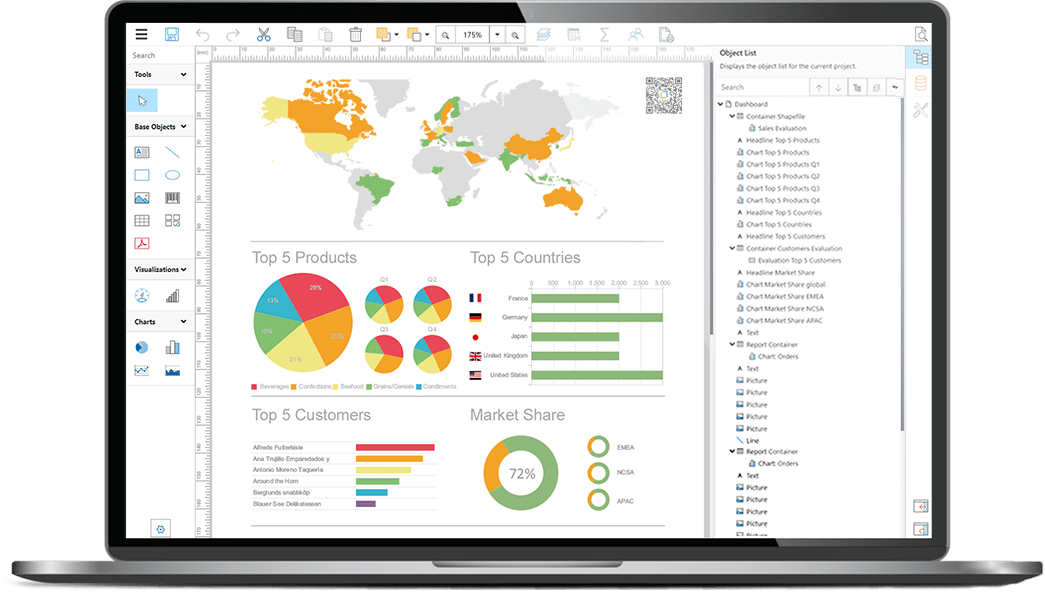
List & Label is a developer-first reporting SDK. It gives you deep API control over report rendering, templating, exporting, and designer embedding—leaving you full control over the backend logic.
When to use it
You’re building a web, cloud, desktop, or cross-platform app.
You want to pass custom, on-the-fly generated data into reports (DataSets, objects, APIs).
You need to create templates with custom logic, dynamic layouts, or deeply nested conditions.
You deploy in Docker, Windows, Linux, or self-managed cloud.
Dev Workflow
- SDK includes full DOM (object model) and data provider integration.
- Supports interactive preview, designer embedding, and rich export formats.
using (var LL = new ListLabel())
{
    LL.DataSource = myData;
    LL.Design(); // or .Print() or .Export()
}
Trade-offs
- Not a standalone platform for business users.
- No native UI, role management, or scheduling — your app handles that.
What is the Report Server?
A browser-based, self-service reporting platform built on List & Label. It enables business users to create, schedule, and share reports without installing any software — while giving developers automation and integration access through REST interfaces.

When to use it
You want business users to design, run, and schedule reports via the browser with no desktop installation required.
You need built-in multi-user access, role-based permissions, and multi-tenancy.
You want to automate exports to email, SFTP, S3, webhooks, or other providers on a schedule.
You prefer a no-code UI for users, while retaining developer control via API.
You want to avoid building your own report portal, editor, or scheduler.
User Workflow
- Set up data sources and connections via the admin GUI.
- Upload or sync List & Label templates into the Report Server.
- Enable browser-based design via the Web Report Designer or Ad-hoc Designer.
- Use the REST API to trigger exports, integrate report previews, or automate workflows.
- Manage tenants, users, roles, and dashboards through the web admin interface.
Trade-offs
- No support for design or preview embedded in your application—this requires the
List & Label SDK.. - Less flexibility for in-code data shaping or dynamic report manipulation than the SDK.
- Requires hosted deployment (e.g., IIS or Windows Service); not suitable for offline scenarios.
You should use List & Label if you…
- …need to render/export reports in code.
- …embed a designer into your app.
- …handle data yourself (datasets, business logic).
- …want full API-level control over layout, logic, and export.
- …deploy in custom, hybrid, or offline environments.
- …need a reporting solution that runs on Linux.
You should use Report Server if you…
- …need non-developers to manage reports.
- …want out of the box role-based access, scheduling, and dashboards.
- …prefer a ready-to-go web-based designer with no desktop installs.
- …don’t want to write UI or build custom tooling.
- …manage multi-tenant access and secure data sharing.
Best of both worlds
-
Devs use List & Label in the core app.
-
Business teams use the Report Server to edit, preview, and schedule.
-
Templates stay portable between the two environments.
💡 Pro tip: Start dev-side with List & Label to deliver value fast. Scale user-side later via the Report Server without rebuilding logic.
Final thought:
Empower devs and users.
List & Label isn’t just another reporting SDK.
The Report Server isn’t just a BI dashboard.
They’re two perspectives on the same engine — tuned for devs and users respectively.
Use both to build what matters faster, and let each persona own their piece of the puzzle.
FAQ
TL;DR: List & Label is ideal when maximum flexibility, API control, and deep reporting via code are the main priorities. The SDK is optimized for software developers who want to control layout logic, data, and export processes themselves.
List & Label is a developer-centric reporting SDK that can be integrated into desktop application, web application, or cloud-native solutions. The core benefit lies in full control over data, logic, and rendering. Software developers can integrate any data source, dynamically generate layouts, and programmatically export or print reports. This is ideal for environments where business logic should not be outsourced or where offline and on-premises operations are crucial.
Additionally, List & Label allows pixel perfect layout design for labels, invoices, delivery notes, documents, or highly dynamic subreports. With the DOM and extensive API, rendering can be precisely controlled and flexibly customized. The SDK is particularly well-suited for projects with deeply embedded reporting requirements or where performance, customization, and data sovereignty are essential.
Typical use cases:
- Reporting within web and desktop applications
- Custom export or automation logic
- Containerized or hybrid architectures
- Projects with many dynamic conditions and layout variations
TL;DR: The Report Server is ideal when business users should be able to create, schedule, or execute reports without developer support – fully browser-based, with role and permission management.
The Report Server provides a self-service platform that enables non-developers to create, edit, and schedule reports. With its web interface, role models, and integrated security mechanisms, the Report Server is especially suitable for organizations that want to offer reporting as a central service without building a custom portal or UI.
A key advantage is decoupled usage: companies can centrally manage data sources, define user roles, and automatically deliver dashboards, reports, or exports. Using the REST API, the server can be seamlessly integrated into existing applications without requiring developers to build reporting interfaces.
Typical use cases:
- Self-service reporting for departments
- Scheduled report delivery (email, SFTP, S3, webhook, cloud)
- Multi-tenant environments with strict separation
- Organizations needing a centralized reporting platform
TL;DR: List & Label = developer control via SDK. Report Server = centralized platform for self-service, management, and scheduling. Both are based on the same reporting engine but target different user roles.
List & Label is a pure developer SDK. It is used directly in the code, offers full control over data and layout, and allows deep customization. Reporting runs within the application, including report designer embedding and data logic.
The Report Server, on the other hand, is a server-based platform. It provides a web interface for managing roles, creating dashboards, and executing reports on a schedule. Business users interact without installation, while developers use API access for automation.
Key differences:
- Operation: software developers vs. business users
- Environment: SDK inside the app vs. centralized server
- Control: maximum flexibility vs. standardized self-service
- Infrastructure: no server needed vs. dedicated server
- Reporting model: embedded vs. web-based
TL;DR: Together, both solutions enable maximum flexibility: software developers integrate List & Label into their apps, while departments independently create and schedule reports via the Report Server.
A hybrid approach combines the strengths of both worlds: the development team uses List & Label within the application to implement data models, export logic, and specialized layouts. At the same time, business teams use the Report Server to modify, share, or schedule reports without developer effort.
The key advantage is portability: templates can be exchanged between the SDK and the Report Server. Developers create base layouts via the SDK, and business users further adapt them. This allows organizations to start quickly and scale efficiently without reconfiguring systems later.
Typical advantages of the hybrid model:
- Developers retain full control over critical layouts
- Business users design standard reports themselves
- Reduced IT workload
- Consistent templates across environments
- Fewer redundant structures, as both tools use the same engine
TL;DR: Self-service reporting enables faster decisions, reduces IT workload, and increases user acceptance of reporting solutions in companies.
Today, companies expect data to be usable without long coordination processes. Business units want to create, update, or schedule reports themselves without waiting for developers. This is exactly where modern self-service platforms come in: they offer an intuitive interface, role-based access, and integrated features such as scheduling, sharing, and dashboards.
This leads to:
- Shorter decision-making processes
- Higher data literacy
- Less dependence on developer resources
- Flexible adaptation to business requirements
- Increased usage rate of the reporting solution
The Report Server addresses this trend with a browser-based report designer, role model, and automation. List & Label complements this where deeper integration or API control is needed.
TL;DR: A hybrid setup is worthwhile when a company requires both developer-driven custom reports and self-service capabilities for departments.
Many organizations need highly customized reports (e.g., invoices, labels, dynamic layouts) that must be generated in code. At the same time, there are requirements for browser-based reporting, collaborative editing, or scheduled exports. A hybrid setup covers both worlds without compromise.
Companies especially benefit when:
- Developers deliver highly complex templates
- Business teams need flexible standard reports
- Reporting is run as an internal service
- Multi-tenant or compliance requirements exist
- Data provisioning is centralized, but rendering is distributed
Since both tools use the same engine, there is no media break. Templates remain compatible, implementation effort decreases, and time-to-value increases.
TL;DR: With List & Label, reporting logic is implemented in code, while the Report Server relies on configuration, browser interaction, and role management.
List & Label follows a classic developer workflow: data is prepared in the code, passed to the SDK, and reports are either designed, printed, or exported. The report designer can be embedded in the application. Software developers define logic, layout rules, conditions, and export options directly in the source code.
The Report Server, however, follows an administrative workflow: data sources are set up via the web interface, permissions are assigned, and reports are created in the browser. Developers integrate the functionality via REST or ClientApi without writing layout logic themselves.
Core difference:
SDK = programmatic control
Report Server = UI-based administration
TL;DR: API-driven reporting is ideal when reports need to be generated dynamically, in the background, or fully automatically.
List & Label enables extensive API control with direct access to the Document Object Models, layout logic, and data flow. It is especially suitable for complex or automated systems where reports are part of a larger pipeline – e.g., ERP, production, logistics, or billing systems.
Typical examples:
- Automated document generation
- Server-side batch rendering
- Dynamic layout adjustments in code
- Integration into microservices
- Context-dependent export logic (PDF, Excel, JSON, etc.)
When layouts or content vary with each request, an SDK approach is almost essential, as self-service systems cannot offer this level of flexibility.
TL;DR: Server-based reporting is suitable for multi-user environments, repeatable workflows, and all cases where security, governance, and scheduling are crucial.
The Report Server centralizes data sources, roles, layouts, and automation. It’s ideal when multiple users collaboratively work on reports, when regular exports are needed, or when companies require clear governance structures.
Typical use cases:
- Cross-departmental report usage
- Scheduled delivery and archiving
- Tenant support and role models
- Browser-based reporting without installation
- Monitoring, dashboards, auditing
This structure is especially helpful in growing organizations that want to operate reporting as a stable, scalable service.
TL;DR: The decision depends on who creates reports, where they are executed, and how much control the application should retain over data and layout.
In practice, a decision model based on three questions is recommended:
Who creates or modifies reports?
Software developers → List & Label
Business users → Report Server
Where do reports run?
Embedded in an app → List & Label
Web- or server-based → Report Server
How much flexibility is needed?
Highly dynamic and logically complex → List & Label
Standardized and plannable → Report Server
Companies with mixed requirements typically use both systems. Developers use the SDK for specialized layouts and data logic, while departments manage routine reports through the server.
The result is an efficient, scalable reporting process with clear responsibilities.
🚀 Get started fast
See what you can build with the Report Server in our interactive online demo. Or try List & Label with your own data using the free trial version.






 Deutsch