

AI for reports.
Under your
control.
List & Label 32 delivers AI where it's actually needed in reporting workflows: the formula wizard, the preview function, and report functions. You can activate each feature explicitly, choose your own model and infrastructure, and work locally. New features include Word export in Cross Platform, token refresh for web components, PDF/UA support, and smaller Excel files.
What's new
- Core principle AI under your control
- LL Classic · WRD Describe formulas instead of looking up syntax
- LL Classic · WRD Review reports faster
- LL Classic · LLCP · WRD AIText$() and AIImage() in the report layout
- LLCP New features in List & Label Cross Platform
- WRD/WRV Keeping web sessions stable
- LL Classic PDF/UA and Excel files without image bloat
- LL Classic New email editor for sending workflows
AI under your control
List & Label 32 doesn't turn AI into background noise in the product. The new functions are opt-in, separately configurable, and integrated. Thus you can fit them into your architecture, security requirements, and logging processes.
01
Disabled by default
No AI feature runs automatically. You decide whether to enable individual wizards for text functions or image generation in the code.
02
Your model, your infrastructure
Use cloud models like Claude, Gemini, Mistral, or GPT, or run supported open source models locally with Ollama. This also lets you cover scenarios where data must not leave your own system or where you want to avoid ongoing API costs.
03
AI directly in the workflow
AI provides targeted support for each step of the reporting process, delivering assistance right where it's needed. Users don't have to open a separate chat, switch between tools, or maintain additional conversation history.
04
Controlled context instead of full access
The model gets no direct access to your data source, your data model, or your application. It only processes the information explicitly passed to it from the report context.
OPTION A Supplied by the developer
You store the key centrally in your application, for example in the configuration or in the secret store. All users use the same AI connection; the cost and control rest with you.
OPTION B Supplied by the end customer
Your application accepts the customer's key, for example via a settings dialog, and passes it to List & Label at runtime. The AI runs via the customer's account and infrastructure.
Formula wizard
Describe formulas instead of looking up syntax
In the formula wizard, users can describe in natural language what the formula should do. List & Label 32 turns this into a normal List & Label formula expression that you can accept, adjust, or discard.
If(LastPage(), Sum(Item.Quantity * Item.UnitPrice) * 1.19, Null())
The suggestion appears as an editable formula in the wizard, including all the usual controls.
The wizard can briefly build on the previous task without you having to re-explain everything.
Anyone who understands the report, but doesn't know every designer function, can find the right formula faster.
Preview
Review reports faster
In the preview, report content can be summarized or translated without exporting the report or copying it into another tool.
Long reports are condensed into a short overview. This is especially helpful for monthly evaluations, minutes, or multi-page documents.
Report text can be translated directly from the preview into the recipients' language.
In addition to the predefined actions, you can apply a free-form prompt to the report content. This makes the function flexible enough to accommodate your own use cases, ranging from targeted questions about the report to custom text processing.
In the live-data preview of the designer and during print preview from your application.
Designer functions
AIText$() and AIImage() in the report layout
Previously, the built-in designer function AI$() let you implement simple AI prompts in code. With version 32, this is complemented by a clearly separated pair of functions: AIText$() for generated text and AIImage() for images. Both can be used in the layout, like any other designer function, with model selection and configuration in your application. In LLCP, you register both as your own designer function.
AIText$("Summarize this report's revenue trend in a maximum of two sentences. Current revenue: " + Str$(CurrentRevenue) + ", prior-year revenue: " + Str$(PriorYearRevenue))
→ “Revenue is currently 8.4 % above last year's figure. This continues the positive trend seen over the period.”
AIImage("Logo for a software company, themes reporting and charts, in green and blue, with the lettering LL.", "1024*1024")

→ Generated image, placed like any other picture object.
The following code snippets show how to activate the two functions AIText$() and AIImage() in the designer and for printing/export in LL classic.
// LL Classic: enable AI – only where you want it
private void CustomAiConfig()
{
    LL.ConfigureAi(ai =>
    {
        // Text functions
        ai.Text.Url    = "http://localhost:11434";
        ai.Text.ApiKey = "YOUR API-KEY";
        ai.Text.Model  = AiTextModel.Ollama("gpt-oss:20b");

        // Image generation – configurable separately
        ai.Image.Model  = AiImageModel.OpenAiGptImage25Flare;
        ai.Image.ApiKey = "YOUR API-KEY";
    });
}
// LL Classic: enable AI – only where you want it
procedure TMainForm.btnDesignClick(Sender: TObject);
begin
  LL.Core.LlSetOptionString(LL_OPTIONSTR_AI_TEXT_URL, 'http://localhost:11434');
  LL.Core.LlSetOptionString(LL_OPTIONSTR_AI_TEXT_MODEL, 'ollama-gpt-oss:20b');
  LL.Core.LlSetOptionString(LL_OPTIONSTR_AI_TEXT_APIKEY, 'YOUR API-KEY');

  // Image generation – configurable separately
  LL.Core.LlSetOptionString(LL_OPTIONSTR_AI_IMAGE_MODEL, 'openai-gpt-image-2.5-flare');
  LL.Core.LlSetOptionString(LL_OPTIONSTR_AI_IMAGE_APIKEY, 'YOUR API-KEY');

  // Assumes the FireDAC connection/data binding is already configured.
  LL.Design;
end;
// LL Classic: enable AI – only where you want it
LlSetOptionString(hLLJob, LL_OPTIONSTR_AI_TEXT_URL, L"http://localhost:11434");
LlSetOptionString(hLLJob, LL_OPTIONSTR_AI_TEXT_MODEL, L"ollama-gpt-oss:20b");
LlSetOptionString(hLLJob, LL_OPTIONSTR_AI_TEXT_APIKEY, L"YOUR API-KEY");

// Image generation – configurable separately
LlSetOptionString(hLLJob, LL_OPTIONSTR_AI_IMAGE_MODEL, L"openai-gpt-image-2.5-flare");
LlSetOptionString(hLLJob, LL_OPTIONSTR_AI_IMAGE_APIKEY, L"YOUR API-KEY");
For LLCP, the two designer functions mentioned must be registered and implemented in the code. Here is an example for AIText$():
// LLCP: AIText$() as its own DesignerFunction –
// you define what it's allowed to do and what it talks to
var aiFunction = new DesignerFunction
{
    FunctionName      = "AIText$",
    MinimalParameters = 1,
    MaximumParameters = 1
};
aiFunction.Parameter1.Type = LlParamType.String;
aiFunction.EvaluateFunction += AiFunction_EvaluateFunction;
LL.DesignerFunctions.Add(aiFunction);
// Callback: this is where the actual AI call happens – synchronous,
// because List & Label needs the result right away
private void AiFunction_EvaluateFunction(object sender, EvaluateFunctionEventArgs e)
{
    e.ResultType  = LlParamType.String;
    e.ResultValue = Task.Run(() => AskOllamaAsync(e.Parameter1.ToString())).Result;
}

private async Task<string> AskOllamaAsync(string prompt)
{
    var builder = Kernel.CreateBuilder();
    builder.AddOllamaChatCompletion(modelId: "gpt-oss:20b", endpoint: new Uri("http://localhost:11434"));
    var kernel = builder.Build();

    var fn = kernel.CreateFunctionFromPrompt(prompt);
    var result = await kernel.InvokeAsync(fn);
    return result.ToString();
}
Image generation: GPT Image 2.5 Flare & GPT Image 2.5 Sunburst. If needed, you can pass additional model parameters as JSON (ParametersJson).
Cross-Platform
New features in List & Label Cross Platform
Version 32 introduces several key features for switching or operating in parallel, including editable Word files, Precalc(), PDF objects, gauges, multi-column subtables, and protection against infinite loops.
Word export (.docx)
Reports can be edited further as real Word documents. Tables are exported as Word tables. This is especially useful for quotes, contract drafts, and minutes that still need further editing after export.
Values are calculated before the engine knows them at the current position. Examples include the number of records in the table header or scale ranges derived from all rows. The function Precalc() closes a relevant compatibility gap with LL Classic.
You can use letterheads, terms and conditions, forms, or DMS documents in the report, either as a free-floating object or data-driven per table row. You can also use PDF documents as templates to place dynamic text, barcodes, and similar elements precisely in forms.
Values and target achievements at a glance: gauges visualize KPIs, utilization, or SLA status clearly on a freely configurable scale. Colors, thresholds, and scale ranges can be adjusted flexibly. If needed, the scale limits can be derived dynamically from the data using the Precalc() function.
Detail data can now flow horizontally across columns instead of only growing vertically. This keeps serial numbers, variants, or attendee lists compact without having to adjust the data model.
The MaximumIdleIterationsPerObject setting aborts exports when an object makes no progress (default: 1,000). This prevents a problematic layout from permanently blocking workers, containers, or web APIs.
using var LL = new ListLabel();

// Configure early – before design, print, or export:
LL.Configuration.MaximumIdleIterationsPerObject = 100;
We've added these functions since the release of LL31, and they're already available with the current service pack.
Web components
Keeping web sessions stable
The Web Report Designer (WRD) and the Web Report Viewer (WRV) now have the functions that are constantly needed by production web apps: runtime token refresh, per-project export defaults, a sidebar for print options, and table-in-table support.
Swap the auth token at runtime
When a JWT expires, you can set a new token on the running element without reloading or remounting it. The open report and UI state are preserved, and onUnauthorized responds to 401 errors. Parallel failures share a single refresh (single-flight). The failed request is retried once.
Framework-independent
designer.onUnauthorized = async () => {
  const response = await fetch("/Authentication/RefreshToken", {
    method: "POST",
    credentials: "same-origin"
  });
  return response.text();  // new token – done
};

// or proactively, before the token expires:
designer.setAccessToken(newToken);
React, Angular, Vue, ASP.NET MVC, plain JS
Export options with memory
For the export options in WRD and WRV, you can now set default values for the specific project and export format directly in the backend (OnProvideExportOptions). This reduces repetitive settings. Users can adjust these defaults in the dialog if needed. Sensitive data such as passwords is not stored.
Only set what differs
public override void OnProvideExportOptions(
    ProvideExportOptionsContext context)
{
    context.Defaults[LlExportOption.XlsShowGridlines] = "0";
    context.Defaults[LlExportOption.PdfAuthor] = "ACME Corp.";
}
Print options sidebar in the WRV
Project-related print options are now visible directly in the WRV. The first option determines the starting position for label projects. Users can specify where label printing should start on sheet 1. This means that partially used label sheets can be reused, reducing costs and material waste.
Table-in-table
In the WRD, a relational table can now also be used and configured directly as a cell within a table.
Export
PDF/UA and Excel files without image bloat
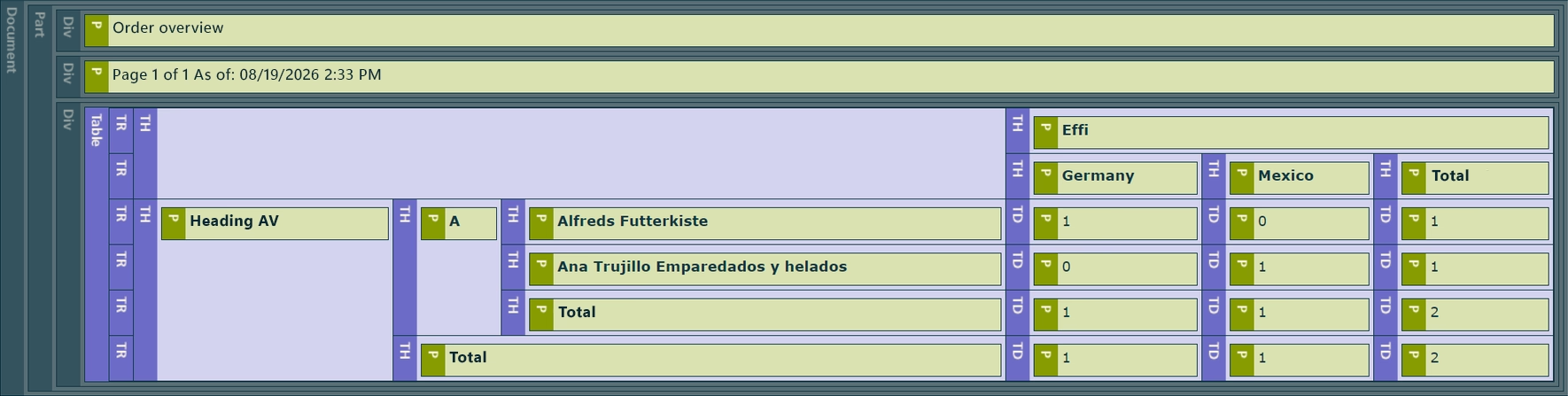
There are two export updates: first, accessible PDF documents can now be created according to PDF/UA. Second, reusing identical images produces significantly smaller Excel files.
PDF/UA support
The new PDF/UA support lets you create accessible PDF documents. This helps companies better meet digital accessibility requirements and internal compliance rules.
Excel export without image bloat
The Excel export identifies and stores identical images only once in the workbook. References to the same image are repeated.
- 01 Typical cases are a logo in the page header, a placeholder image in product lists, or recurring icons and status graphics.
- 02 Smaller .xlsx files are noticeable when sending emails, uploading to DMS/API connections, or archiving reports, among other things.
- 03 No rework needed: the optimization kicks in automatically on export. Existing layouts can stay unchanged.
New email editor for sending workflows
The built-in email editor in List & Label 32 is significantly more user-friendly. The new interface resembles familiar email clients like Outlook, providing end users with an environment that is both familiar and intuitive for composing and sending emails.
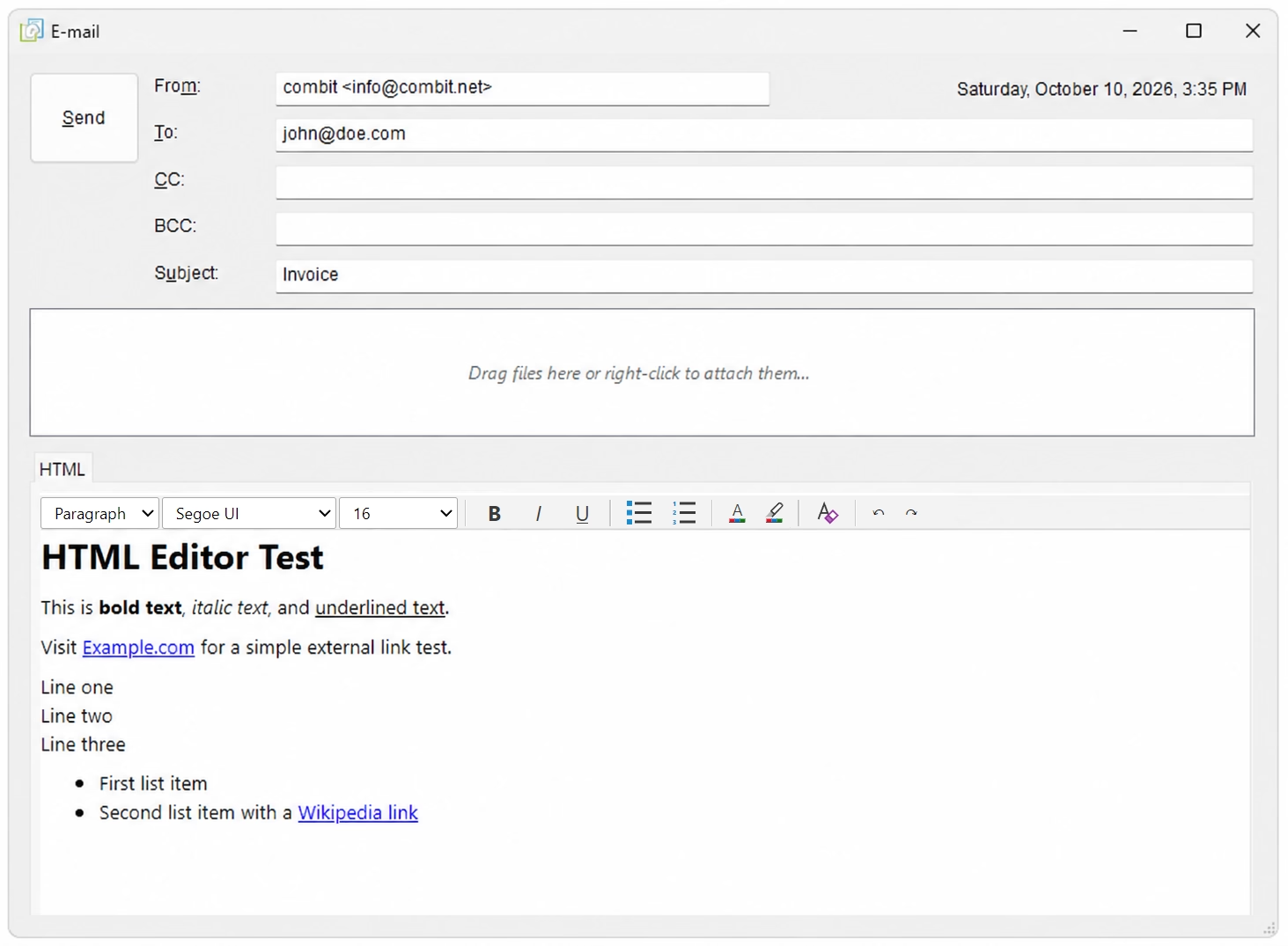
- 01 Recipient, subject, message body, and attachments are laid out clearly.
- 02 Additional files such as terms and conditions, receipts, or supplementary documents can be sent easily alongside the generated report.
- 03 HTML emails can now also be formatted directly in the editor – including font, font size, colors, bold and italic text, and more.
Overview
Which update belongs to which component?
The matrix shows at a glance which features are available in LL Classic, Cross Platform, and the web components.
| Component / feature | LL Classic | WRD / WRV | LLCP |
|---|---|---|---|
| AI functions | |||
| AI in the formula wizard (text-to-formula) | ● | ● | – |
| AI in the preview: summarize, translate & custom prompt | ● | ● | – |
| Designer functions AIText$() & AIImage() | ● | ● | ● |
| Cross Platform | |||
| Word export (.docx) with real Word tables | ● | ● | ● |
| Precalc() support | ● | ● | ● |
| PDF objects (free-floating & in table cells) | ● | ● | ● |
| Gauges (free-floating & in table cells) | ● | ● | ● |
| Horizontally filled, multi-column subtables | ● | ● | ● |
| MaximumIdleIterationsPerObject (infinite-loop protection) | ● | ● | ● |
| Web components | |||
| Runtime auth token refresh + onUnauthorized | – | ● | – |
| Default values for export options | ● | ● | – |
| Print options sidebar (label starting position) | ● | ● | – |
| Table-in-table | ● | ● | ● |
| Export | |||
| PDF/UA support for accessible PDF documents | ● | ● | – |
| Excel export: smaller files through image reuse | ● | ● | ● |
| New email editor for sending workflows | ● | – | – |
You build the software.
We deliver the reports.
Try List & Label 32 for free! Fully functional with AI features, cross-platform capabilities, and web components. There is no need to rework your architecture, and you have full control over your data, layout, and output.
Over 30 years of experience
Product development of List & Label
Browse the new features of every version or check out this this tabular feature comparison to see the progress made between two versions of List & Label.










 Deutsch